
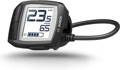
Le display Bosch Purion ne s’allume plus : causes et solutions
Vous êtes prêt pour une belle balade à vélo, le soleil brille et la batterie de votre e-bike est entièrement chargée. Mais voilà qu’un problème frustrant survient : vous appuyez sur le bouton d’allumage de votre display Bosch Purion… et l’écran reste complètement noir. Le moteur ne fournit aucune assistance et votre vélo électrique se transforme soudainement en vélo classique, lourd et difficile à pédaler. Parfois, le display s’éteint même en plein trajet.
Si cela vous arrive, inutile de paniquer immédiatement. Un display Bosch Purion qui ne démarre pas est un problème courant, et dans de nombreux cas, il peut être résolu facilement par vous-même. Dans cet article, nous passons en revue les causes possibles et les solutions les plus efficaces, allant d’un simple remplacement de piles à une intervention chez un spécialiste.
Écrit par : Hanna Stevens | 2 Avril 2026 | Temps de lecture : 6 minutes

En savoir plus sur l’auteure : Hanna Stevens
Hanna est une passionnée de vélo qui adore explorer de nouveaux itinéraires et partager ses expériences pour inspirer les autres à enfourcher leur bicyclette plus souvent.
Principales conclusions
- Les piles bouton déchargées sont la cause la plus fréquente
- Un démarrage via la batterie principale est souvent possible (démarrage d’urgence)
- Si rien ne fonctionne : un diagnostic professionnel est nécessaire
Cause 1 : piles bouton vides ou incorrectes dans le display
La solution
- Respectez la polarité : placez les deux piles CR2016 l’une sur l’autre, avec le côté positif (+) vers le haut. Refermez ensuite le compartiment (avec une pièce de monnaie si nécessaire).
- Choisissez une marque fiable : les piles bas de gamme ou sans marque peuvent provoquer des problèmes rapides. Les piles de qualité (comme Maxell) sont recommandées.
- Ignorez une erreur dans le manuel : certains manuels Bosch mentionnent des piles 1,5 V : c’est incorrect. Les CR2016 sont toujours en 3 V.
- Vérifiez la tension : testez les piles avec un voltmètre avant installation pour éviter d’utiliser des piles neuves mais déchargées.
Solution en déplacement : le “démarrage d’urgence”
- Avec une batterie PowerPack : appuyez sur le bouton test/allumage près des LED. Si les voyants s’allument, le système démarre souvent.
- Avec une batterie PowerTube : cherchez le bouton d’allumage intégré dans le cadre (souvent discret). En appuyant dessus, le système peut redémarrer.
Cause 2 : mauvaises connexions ou contacts défectueux
La solution
- Vérifiez la batterie : assurez-vous qu’elle est correctement enclenchée
- Contrôlez les connexions : vérifiez le câble au niveau du display
- Recharge via USB : utilisez le port micro-USB (5V, max. 600 mA) pour charger le display (jusqu’à 3 heures). Refermez bien le capuchon ensuite
Cause 3 : câble endommagé ou soudure défectueuse
La solution
- Recherchez des plis, frottements ou dommages
- Vérifiez s’il est pincé dans le cadre
- Contrôlez les connexions au moteur (corrosion possible, par exemple verdâtre)
Cause 4 : display ou contrôleur moteur défectueux
La solution
- Tester ou remplacer : remplacez le display Purion ou optez pour un modèle Bosch plus récent (Intuvia, Kiox)
- Diagnostic chez un revendeur : un spécialiste Bosch peut lire les codes d’erreur et effectuer une mise à jour logicielle